

Implementieren Sie eine professionelle Besucherzählung in Ihrem Einzelhandelsgeschäft durch WordPress-Plugins, die Kundenfrequenz-Daten mit Ihrer Online-Präsenz synchronisieren. Integrieren Sie Sensoren am Ladeneingang mit WordPress-Dashboards, um Echtzeit-Analysen zu Stoßzeiten, Conversion-Rates und Personalplanung zu erhalten. Wählen Sie Plugins mit API-Schnittstellen, die Hardware-Zählsysteme anbinden und automatisch Berichte generieren, sodass Sie datenbasierte Entscheidungen treffen können ohne komplexe Softwarelösungen zu benötigen. Kombinieren Sie physische Besucherstatistiken mit Website-Analytics in einem zentralen WordPress-Backend, um ein vollständiges Bild Ihrer Kundeninteraktionen zu erhalten.
Diese Verschmelzung von stationärem Handel und digitaler Verwaltung bietet Einzelhändlern einen entscheidenden Wettbewerbsvorteil. WordPress entwickelt sich zunehmend zur Steuerungszentrale für hybride Geschäftsmodelle, bei denen Online- und Offline-Daten zusammenfließen. Die richtigen Plugins verwandeln Ihre WordPress-Installation in ein leistungsfähiges Besuchermanagement-Tool, das Ihnen zeigt, wann Kunden kommen, wie lange sie bleiben und welche Bereiche am meisten frequentiert werden – alles ohne teure Spezialsoftware oder IT-Abteilung.
Why Retail Businesses Need Visitor Counting Beyond Google Analytics
If you run a brick-and-mortar retail store, Google Analytics tells you who visits your website, but it can’t count the customers walking through your physical doors. This gap in data can leave you making critical business decisions based on guesswork rather than solid evidence.
Understanding your actual foot traffic transforms how you operate. When you know your busiest hours, you can schedule staff more efficiently, avoiding both overstaffing during slow periods and understaffing when customers need help. This single insight can significantly reduce labor costs while improving customer service.
Visitor counting also reveals your true conversion rate. If 500 people enter your store but only 50 make purchases, that’s a 10 percent conversion rate. Without accurate foot traffic data, you might think your sales are underperforming when they’re actually strong for your visitor volume, or vice versa. This clarity helps you set realistic goals and identify genuine problems.
Marketing campaigns become measurable beyond online metrics. Did that weekend promotion actually bring more people into your store? How effective was your window display change? Comparing visitor counts before and after marketing initiatives shows real-world impact, helping you invest your budget where it delivers results.
Operational insights emerge from tracking patterns over time. You’ll spot seasonal trends, understand how weather affects traffic, and identify which days warrant special promotions. These patterns help you plan inventory, schedule maintenance during quiet periods, and optimize store layouts based on actual customer behavior.
The right tools to enhance your business through technology don’t require enterprise-level budgets. WordPress-based visitor counting solutions bring these powerful retail analytics within reach of small and medium businesses, bridging the gap between your physical presence and data-driven decision-making.
How WordPress Plugins Bridge Your Online and Offline Data
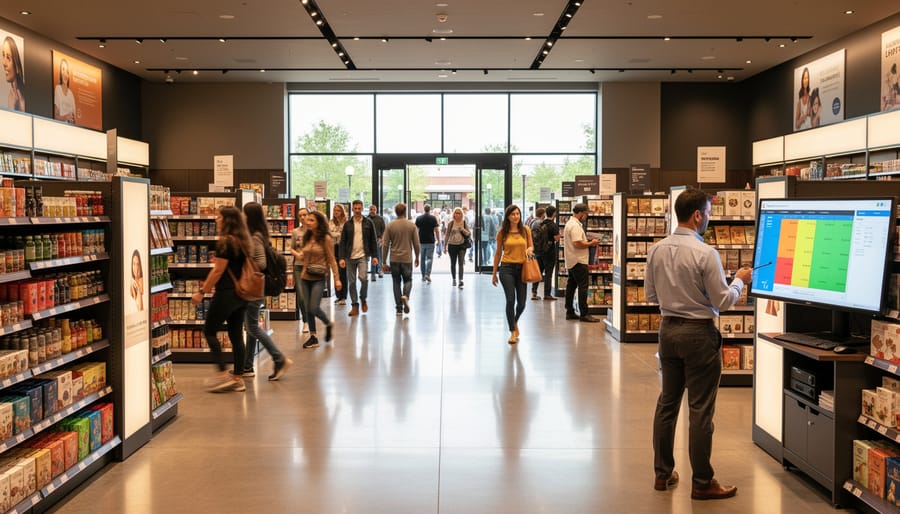
At first glance, WordPress and retail foot traffic seem worlds apart. WordPress powers your website, while your store operates in the physical realm. However, this gap is precisely what makes WordPress plugins for retail visitor counting so valuable. When connected to simple sensors, manual counting devices, or even smartphone-based tracking systems, WordPress transforms into a centralized dashboard where your offline customer data comes to life.
The magic happens through integration. Modern counting sensors placed at your store entrance can communicate with your WordPress site through APIs or direct plugin connections. Some solutions work with affordable hardware like infrared sensors or camera-based systems, while others accommodate manual input methods perfect for smaller operations. Once configured through a straightforward WordPress dashboard setup, these plugins begin collecting, organizing, and visualizing your foot traffic patterns.
What makes this approach particularly empowering for small and medium-sized retailers is accessibility. You’re already familiar with WordPress for managing your online presence, so extending that knowledge to track in-store visitors feels natural rather than overwhelming. Your website becomes more than a digital storefront; it evolves into a business intelligence hub where you can compare online engagement with physical visits, identify peak shopping hours, and make data-driven decisions about staffing and inventory. This bridge between online and offline operations gives you the comprehensive view larger retailers invest thousands to achieve, without the complexity or cost.

What to Look for in a WordPress Visitor Counting Plugin for Retail
Real-Time Data Display and Reporting
The true power of visitor counting lies in how quickly you can access and act on the data collected. Live dashboards transform raw visitor numbers into actionable insights, giving you an immediate snapshot of foot traffic patterns as they unfold throughout your business day. These real-time displays allow you to spot peak hours, identify slow periods, and make on-the-spot staffing adjustments that directly impact customer service quality and operational costs.
Historical reporting complements this immediacy by revealing longer-term trends and seasonal patterns. With well-designed reporting features, you can compare today’s traffic against last week, last month, or even last year—helping you understand which marketing campaigns drive actual store visits and which promotions truly resonate with customers. Look for plugins that offer customizable date ranges, visual graphs, and exportable reports that make data sharing with your team straightforward.
The combination of live monitoring and historical analysis empowers you to move from reactive decision-making to proactive strategy. Whether you’re optimizing store layouts, planning staff schedules, or evaluating location performance, having this information at your fingertips transforms how you understand and serve your customers.
Integration Capabilities with Counting Hardware
The real power of visitor counting plugins lies in their ability to connect seamlessly with various hardware solutions already monitoring your retail space. Modern WordPress plugins support multiple integration methods, making data collection surprisingly straightforward.
Most quality plugins offer direct compatibility with infrared sensors positioned at store entrances, automatically importing count data through API connections or CSV file uploads. These sensors provide accurate traffic measurements without requiring customer interaction. Similarly, advanced camera-based systems with built-in analytics can feed visitor data directly into your WordPress dashboard, often in real-time.
WiFi tracking presents another sophisticated option, detecting smartphone signals as customers move through your space. This method not only counts visitors but can also reveal dwell times and movement patterns. For smaller operations or those just starting out, manual counting apps offer a budget-friendly alternative—staff members simply tap their smartphones to record entries, with data syncing to WordPress at day’s end.
The key is choosing a plugin that supports your existing or planned hardware infrastructure. Look for solutions offering flexible import options, whether through automated API connections, scheduled file transfers, or manual uploads. This flexibility ensures your counting system grows alongside your business needs without requiring complete overhauls.
Customizable Data Visualization
Data means little without context, and that’s where customizable visualization transforms raw visitor numbers into actionable insights. The right plugin should offer flexible charts, graphs, and display formats that speak to each stakeholder’s unique needs. Store managers might prefer simple daily traffic graphs to optimize staffing schedules, while executives need comparative analytics showing monthly trends across multiple locations.
Think of visualization options as your data storytelling toolkit. Heat maps can reveal which store areas attract the most attention, bar charts compare peak hours across weekdays, and line graphs track seasonal patterns over time. The beauty lies in choosing how to present information—whether that’s a clean dashboard widget for quick morning check-ins or detailed downloadable reports for board meetings.
Your plugin should let you customize colors, timeframes, and data points without requiring coding knowledge. Filter by specific dates, combine metrics, or isolate individual store performance. This flexibility ensures everyone from floor staff to upper management sees data in the format that resonates with them, turning visitor counts into strategic decisions that drive real business growth.
Setting Up Your WordPress Retail Visitor Counting System
Choosing Your Counting Method
Selecting the right counting method directly impacts both your budget and the accuracy of your visitor data. Let’s explore three practical approaches that retail business owners can implement, each offering distinct advantages depending on your specific circumstances.
Manual counting remains the most budget-friendly option, requiring nothing more than staff vigilance and simple tally sheets. While this approach costs virtually nothing to implement, it demands consistent employee attention and works best for smaller stores with predictable traffic patterns. The trade-off is obvious: human error and inconsistent tracking can compromise your data quality, making it difficult to establish reliable trends.
Affordable sensor options represent the sweet spot for many small to medium-sized retailers. Basic infrared or pressure mat sensors, often priced between 50-200 euros, connect directly to your WordPress system through compatible plugins. These devices automate the counting process while remaining accessible for business owners without extensive technical expertise. They deliver reasonably accurate counts and eliminate the burden on your staff, though they may struggle with distinguishing between customers entering and exiting or accurately counting groups.
Advanced automated systems incorporate technologies like thermal imaging or AI-powered cameras, offering precision counting with detailed analytics about customer movement patterns and dwell times. While these solutions typically start at several hundred euros, they provide comprehensive insights that justify the investment for larger retailers or those seeking sophisticated customer behavior analysis. These systems integrate seamlessly with WordPress plugins designed for professional retail analytics, transforming raw visitor counts into actionable business intelligence that can reshape your store operations and marketing strategies.
Connecting Data to Your WordPress Dashboard
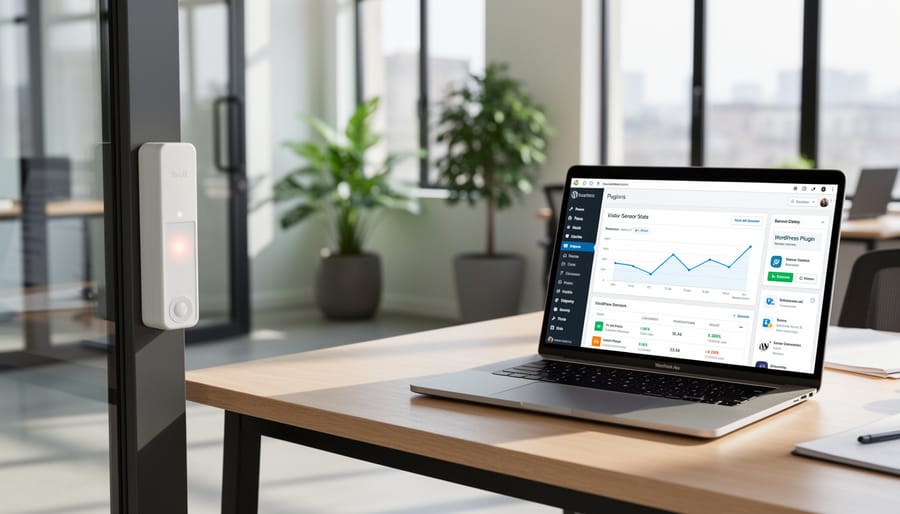
Understanding how visitor counting data reaches your WordPress dashboard doesn’t require a technical degree. The process is surprisingly straightforward and can be broken down into three simple stages that work together seamlessly.
First, physical counting devices installed at your retail entrance capture visitor movement. These can range from infrared sensors to camera-based systems that detect when someone enters or exits your store. Modern devices are designed to be accurate and unobtrusive, collecting anonymous traffic data throughout your business hours.
Next, this collected data needs a bridge to your website. Most counting systems connect to the internet through WiFi or cellular networks, transmitting information to a cloud-based service or directly to your WordPress installation. This happens automatically in the background, typically updating every few minutes or hours depending on your configuration.
Finally, your WordPress plugin retrieves this data and transforms it into visual, easy-to-understand displays on your dashboard. The plugin acts as an interpreter, taking raw numbers and converting them into graphs, charts, and statistics that help you make informed business decisions. Think of it as your personal analytics assistant, always working to keep your data current and accessible.
The beauty of this system is its automation. Once properly configured, you won’t need to manually transfer data or perform complicated updates. The plugin handles everything, letting you focus on what matters most: understanding your customer patterns and growing your retail business. Just remember to prevent WordPress updates from breaking your carefully configured setup by testing changes in a staging environment first.
Making Your Visitor Data Work for Your Business
Collecting visitor data is just the first step—the real value comes from transforming those numbers into actionable business insights. Your WordPress visitor counting plugin becomes a powerful decision-making tool when you know how to interpret and apply what it reveals.
Start by establishing baseline metrics. Track foot traffic patterns throughout different days and times to identify your peak hours and slower periods. This information helps you optimize staff scheduling, ensuring you have adequate coverage during busy times without overstaffing during lulls. You’ll reduce labor costs while maintaining excellent customer service.
Use traffic trends to evaluate marketing campaigns. If you run a promotion or advertise an event, your visitor count data shows whether those efforts actually drove people through your doors. Compare pre-campaign and post-campaign numbers to calculate your return on investment and refine future marketing strategies.
Seasonal patterns matter too. By analyzing visitor data over months, you’ll spot predictable fluctuations that help with inventory planning and promotional timing. Understanding when customers naturally gravitate to your store lets you align product displays and special offers with actual shopping behaviors.
Consider the conversion rate—the percentage of visitors who make purchases. If your foot traffic increases but sales remain flat, you’ve identified a different challenge: your in-store experience or product offering may need attention. This insight helps you manage your business more strategically.
Finally, combine visitor data with other metrics like average transaction value and popular product categories. This holistic view reveals opportunities for layout improvements, product placement optimization, and targeted upselling strategies that directly impact your bottom line.
WordPress plugins have truly transformed the landscape of retail analytics, putting professional-grade visitor tracking tools within reach of every small and medium-sized retailer. What was once reserved for large chains with substantial budgets is now accessible through flexible, affordable solutions that integrate seamlessly with your existing systems. The beauty of these tools lies in their simplicity—you don’t need a technical background or a dedicated IT team to start gathering meaningful insights about your customer traffic patterns.
Taking that first step toward data-driven decision-making might feel daunting, but remember that even basic visitor counting provides valuable information that can improve your operations. Start small, choose a plugin that matches your current needs, and let the data guide your growth. Whether you’re optimizing staff schedules, planning marketing campaigns, or simply understanding when your busiest hours occur, these insights empower you to run your retail business more efficiently and profitably. The technology is ready—now it’s your turn to harness its potential.